
Download GAJIX – AI Learning Assistant Tool Review
Overview
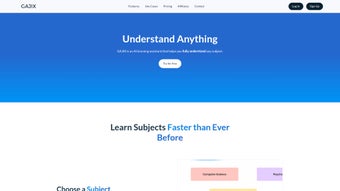
GAJIX is an AI‑driven learning assistant that promises to transform the way students, professionals, and lifelong learners absorb information. Powered by cutting‑edge natural language processing and deep‑learning models, GAJIX can instantly generate concise summaries, clear explanations, and targeted question sets for virtually any subject you throw at it—from constitutional law and molecular biology to advanced algorithms in computer science. What truly sets GAJIX apart is its “topic‑tree” engine, which loads all relevant sub‑topics and inter‑connections, giving users a panoramic view of a discipline in a single click.
According to the developers, this comprehensive approach can boost learning productivity by up to 75 %, a claim that resonates strongly with anyone who has struggled to piece together fragmented resources across the web. The platform also includes a built‑in relevance filter that highlights why each concept matters in real‑world contexts, encouraging users to apply knowledge rather than simply memorize facts. GAJIX offers a free 30‑day trial, allowing prospective users to experience its AI‑powered tutoring without any upfront cost.
Whether you are preparing for a bar exam, cracking a genetics quiz, or upskilling for a data‑science role, GAJIX aims to be the single, secure, and continuously updated tool that keeps you ahead of the learning curve. In practice, the software integrates seamlessly with note‑taking apps, cloud storage services, and even popular learning management systems, making it a versatile hub for all of your study material. The user interface is clean, with a dark‑mode option that reduces eye strain during long study sessions, and the overall experience feels both modern and intuitive.
By combining speed, depth, and adaptability, GAJIX positions itself as more than just a summarizer—it becomes a personal tutor that learns from your interactions and tailors future content to match your evolving mastery level.
Powerful Features That Redefine Self‑Learning
- Instant Summaries & Explanations: Input any topic or paste a web page URL, and GAJIX delivers a clear, concise summary in seconds, stripping away jargon and highlighting core ideas.
- Dynamic Question Generator: After each summary, GAJIX produces a curated list of comprehension and application questions designed to deepen retention.
- Full Topic‑Tree Loading: The AI automatically maps related sub‑topics, providing a hierarchical view that helps learners see how concepts interlink.
- Cross‑Disciplinary Knowledge Base: From law and medicine to computer science and humanities, GAJIX’s training data spans thousands of domains.
- Career‑Focused Insights: Each module includes a short “Why It Matters” segment that explains industry relevance and potential career pathways.
- Personalized Learning Paths: Users can mark mastery levels, and GAJIX will adjust the difficulty of subsequent questions and suggest next‑step topics.
- Secure Cloud Sync: All notes, progress, and generated content are encrypted and stored in the cloud, allowing seamless access across devices.
- Regular AI Model Updates: The backend receives monthly updates, ensuring the latest research findings and educational standards are reflected.
- Free 30‑Day Trial & Affordable Subscription: Experience full functionality without commitment, then choose from flexible pricing plans.
- Multi‑Platform Availability: GAJIX works on Windows, macOS, Android, and iOS, making it a truly portable learning companion.
Each feature has been designed with the learner’s time constraints in mind. For example, the instant summary engine leverages transformer‑based models that can parse and condense a 10‑page academic article in under 15 seconds, freeing users from endless scrolling. The question generator doesn’t merely recycle textbook queries; it crafts scenario‑based problems that mimic real‑world challenges, encouraging critical thinking and problem‑solving skills that are highly valued by employers.
Moreover, the topic‑tree visualization is interactive—click any node to dive deeper, or collapse branches to focus on core ideas. This visual scaffolding mirrors proven cognitive‑load theory, helping users retain information longer and build mental models that connect disparate ideas. GAJIX’s secure cloud sync means you can start a study session on a laptop at home, continue on a tablet during a commute, and finish on a phone while waiting in line, without losing any data.
The regular AI model updates act like a living textbook, automatically incorporating the latest scientific discoveries, regulatory changes, and industry trends, so you never fall behind. Finally, the cross‑platform availability ensures that whether you are a Windows power user, a Mac designer, an Android commuter, or an iOS enthusiast, the experience feels native, responsive, and consistent across all devices. In short, the feature set is a cohesive ecosystem that bridges the gap between passive reading and active mastery, turning every study hour into a high‑impact learning sprint.
Installation, Setup & Compatibility
Step‑by‑Step Installation Guide
Installing GAJIX is straightforward, regardless of your operating system. Begin by visiting the official GAJIX website and clicking the “Download” button that corresponds to your platform. For Windows users, you’ll receive an .exe installer; macOS users get a signed .dmg package; Android users are directed to the Google Play Store, while iOS users can download from the App Store. Once the installer is saved, run it and follow the on‑screen prompts: accept the license agreement, choose an installation folder (the default works for most), and click “Install.” The process typically completes within two minutes, and the installer performs a quick integrity check to verify that the package has not been tampered with.
After installation, launch GAJIX and create a free account using your email address or a supported single sign‑on (SSO) provider such as Google or Microsoft. The onboarding wizard walks you through setting your learning preferences—select your primary fields of interest, preferred difficulty level, and whether you want daily push notifications for new content. You’ll also be prompted to enable cloud sync, which is highly recommended for cross‑device continuity.
Once you finish the wizard, GAJIX will perform a quick system check to verify that your device meets the minimum hardware requirements (2 GB RAM, 500 MB free disk space, and an internet connection for AI model queries). If any issues are detected, the wizard offers automated fixes or suggestions, such as freeing up disk space or updating graphics drivers. Advanced users can also opt to customize the cache size or enable GPU acceleration for faster processing on compatible hardware.
Operating System Compatibility
GAJIX has been built with a cross‑platform framework, ensuring native performance on the following operating systems:
- Windows 10, 11 (64‑bit)
- macOS 12 Monterey and newer (Apple Silicon and Intel)
- Android 9 (Pie) and above
- iOS 14 and above (iPadOS included)
Once installed, you can start a learning session by typing a query into the main search bar, pasting a URL, or selecting a pre‑built curriculum from the “Explore Topics” library. The AI engine works in real time, so you’ll receive immediate feedback and can iterate on follow‑up questions without leaving the application. Regular updates are delivered automatically via the built‑in updater, ensuring you always have the latest AI improvements and security patches without manual intervention. If you prefer manual control, the settings panel lets you schedule update checks or defer them to a convenient time, such as overnight, to avoid interruptions during critical study periods.
Pros & Cons + Frequently Asked Questions
Pros
- Lightning‑fast AI‑generated summaries save hours of reading.
- Comprehensive topic‑tree visualization aids in holistic understanding.
- Dynamic question generator promotes active recall and deeper learning.
- Cross‑platform support ensures seamless transition between devices.
- Secure cloud sync protects data and enables progress tracking.
- Free 30‑day trial allows risk‑free evaluation.
- Monthly AI model updates keep content current and accurate.
- Customizable learning paths adapt to individual mastery levels.
- Export options (PDF, Markdown, CSV) simplify sharing and archiving.
- Integration with popular LMS platforms expands institutional use.
Cons
- Requires a stable internet connection for AI processing.
- Advanced features (e.g., custom curriculum creation) are locked behind higher‑tier plans.
- Initial learning curve for users unfamiliar with AI‑assisted tools.
- Mobile app UI can feel cramped on very small screens.
- Subscription pricing may be a barrier for students on a tight budget.
Frequently Asked Questions
Is GAJIX really free during the trial?
Yes. GAJIX offers a 30‑day free trial that includes full access to all core features, including topic‑tree loading and the question generator. No credit card is required to start the trial, and you can cancel at any time before the trial ends without being charged.
Can I use GAJIX offline?
GAJIX relies on cloud‑based AI models, so an internet connection is needed for real‑time summarization and question generation. However, once content is generated, you can view saved summaries and notes offline through the “My Library” section.
How secure is my data?
All user data, including saved notes and progress, is encrypted both in transit (TLS 1.3) and at rest (AES‑256). GAJIX complies with GDPR and CCPA regulations, and you can opt‑out of data collection for analytics in the privacy settings.
What subscription plans are available after the trial?
GAJIX offers three paid tiers: Basic ($9.99 / month) for individual learners, Professional ($19.99 / month) with advanced analytics and custom curriculum tools, and Enterprise (price on request) that includes on‑premises deployment and dedicated support.
Does GAJIX integrate with other learning platforms?
Yes. GAJIX supports export of summaries and question sets to popular formats such as PDF, Markdown, and CSV. It also offers API endpoints for LMS integration, allowing institutions to embed GAJIX capabilities directly into their existing curricula.
Conclusion & Call to Action
In a market flooded with generic study apps, GAJIX stands out as a truly intelligent learning companion. Its ability to instantly distill complex material, map out interconnected concepts, and generate purposeful practice questions makes it a valuable asset for anyone serious about mastering new subjects. While a constant internet connection is a prerequisite and some premium features require a subscription, the overall value proposition—especially the productivity boost of up to 75 %—justifies the cost for most learners. The platform’s emphasis on security, regular AI updates, and cross‑platform availability further strengthens its appeal for both individual users and educational institutions. Whether you’re a university student juggling multiple courses, a professional seeking to upskill, or a curious self‑educator, GAJIX offers a secure, regularly updated, and cross‑platform solution that keeps knowledge acquisition efficient and engaging.
Ready to experience AI‑enhanced learning for yourself? Click the button below to start your free 30‑day trial, download the appropriate version for your device, and begin turning dense information into clear, actionable insight—all without spending a dime. Take advantage of the trial to explore every feature, from instant summaries to the dynamic question generator, and see firsthand how GAJIX can reshape your study habits and accelerate your progress toward mastery.
Start My Free Trial


.png)



